


Rydeen TOMBO 360X Rearview Mirror with 360° Camera
Rydeen TOMBO 360X Rearview Mirror with 360° Camera
Couldn't load pickup availability
TOMBO 360X
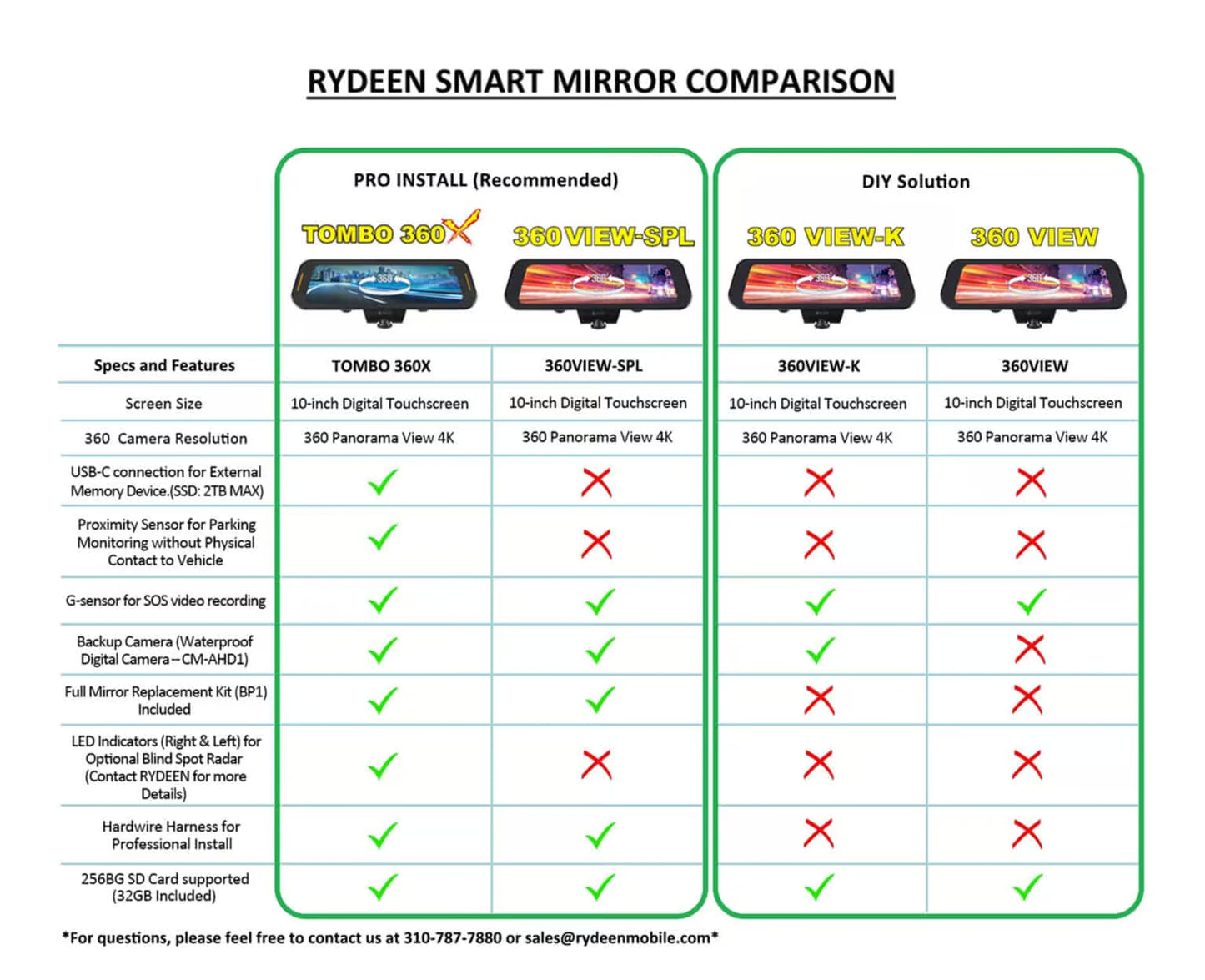
360 Surround View Frameless Rearview Mirror with 4K Dash Camera and 10-inch Touchscreen TFT Monitor with blind spot indicators built in for optional use through ext-026 cable (sold separately), and any Rydeen blind spot system (sold separately), a Hardwire Power Harness, Rear Camera, Windshield Install Kit & Mount, and a Proximity Sensor for Parking Monitoring
Product Highlights:
- 360-degree video rearview replacement mirror with touchscreen
- 10-inch mirror DVR with TFT screen
- Auto sensing photo sensor for TFT screen brightness control
- Proximity sensor for parking monitoring
Product Details
The TOMBO 360X is a universal touchscreen 10-inch frameless rearview mirror with built-in dash cam/HD monitor with 360 surround video recording features. Users can then choose to display the front of the car, sides of the car and the rear seat, for monitoring passengers. Frameless Infinity Polished Edge Mirror Design for clean look, using optic bonding for monitor assembly with no air gap between the front glass and TFT screen for ultra-high brightness, and high color contrast viewing. Includes an auto sensing photo sensor for TFT screen brightness control, so automatically set to maximum brightness during daytime and less bright during night. Users can swipe left and right on the mirror to view the particular perspective they wish to see, with split screen views of multiple angle options, TOMBO 360X can show a 360-degree view simultaneously on all multiple view selections for complete viewing coverage
The TOMBO 360X comes with a proximity sensor, where it will automatically record if an object or person comes within 10 feet to your vehicle. There are also LED indicators on the mirror itself enabling blind spot detection by adding RYDEEN Blind Spot Radar Safety products with internal LED indicators (connector cable P/N EXT-026 and blind spot products are sold separately). Making the installation easy by eliminating the need to remove the A-pillar and drilling holes for installers.
The TOMBO 360X also includes a USB-Type C connector, to easily transfer your recorded videos to an external storage device. Video playback will show location, time and date when GPS is connected.
TOMBO 360X includes a windshield mount (standard VSM-AV), AHD rear camera for backup view (video auto-trigger switching, viewing angle adjustable), hardwire cable, and proximity sensor. Call our technical support for details.
- Windshield Install Backpack Adaptor with replacing OEM mirror
- Rear AHD Camera allows for backup view (auto trigger) and rearview (streaming view) also the video records on the 2nd channel of TOMBO 360X DVR recording
- Proximity Sensor for Parking Monitor
- Hardwire Power Cable allows Reverse Trigger, Last View Setting Memory, LED to RYDEEN Blind Spot (BSD) Kits (P/N EXT-026 connection cable sold separately), Continuous Power to 2nd Memory Drive (SSD) after ACC is off
PSS-001 (Optional)
Proximity Sensor for Tombo 360X
The optional proximity sensor PSS-001 works under the parking monitoring mode for Tombo 360X (optional).
30-second SOS video will be recorded after triggering the video recording by motion or simply sensing objects within the sensing area of PSS-001.
The proximity sensor PSS-001 can be installed on the front windshield or the roof of car, which can be installed horizontally or vertically according to the application scenario.
Product Specs
Basic Parameters
- Video Input (backup camera): AHD
- System Language: English, Japanese, French, Spanish
- Screen Dimensions: 9.55 inches
- Touch Screen Type: Resistive
- Front Camera: H360°/27.5 fps
- Audio Line-Out: Built-in 8Ω/ 2W speaker* 1 for audio/voice playback
- Audio Power (Internal): 4Q2W
- Power Supply Voltage: DC 9V to 24V
- Rated Current: 600mA
- Super Capacitor Size: 8.5*17*32MM
- System: Linux
- Storage: Built-in Micro-SD slot, External backup SSD
- Operational Temperature: -10℃~ +60℃
- Storage Temperature: -30℃~ +70℃
- Operational Humidity: 45%~80%RH
- Storage Humidity: 30%~90%RH
GPS Hardware Parameters
- Date Update Rate: 1Hz
- Warm Startup Time: 1 Sec (average)
- Cold Startup Time: <33 Sec (average)
- Maximum Speed Rate: <280 m/s
- GPS Antenna Gain: 30dB
- Power Voltage: 3.3V
In the Box
- TOMBO 360X Main Unit
- Backpack Adaptor for Mirror Stem
- AHD Backup Camera
- AHD Camera Extension Cable
- Proximity Sensor
- Power Wire Harness for Hardwire Installation
- VSM-AV Mirror Stem Fit Most Vehicles
- D-Tab
- GPS Unit
- Mounting Adhesive
- Velcro Straps
- Type C-USB Adaptor
- MicroSD Inserted in Slot
- Mirror Cleaning Cloth
- Pry Tool
- Screw Driver
- L-shaped Tool for MV Series


Features
Micro SD Card
Included with your rearview mirror monitor is a 32GB Micro SD card to be used right away. You can always upgrade to a 400GB for max card size.
Rear Camera
With the addition of the AHD rear camera, drivers will be able to view live stream backup image and record simultaneously. Basically, drivers can view the rear camera video image as a rear view mirror, especially convenient for cargo vans and utility trucks with no visual of the rearview mirror.
GPS Location Tracking Map Display
GPS will track your location and record time of all DVR video files for playback.
Parking Monitor
Using the combination of both G-sensor and Proximity sensor, parking monitor will be activated when either feature is triggered while the vehicle is parked.
Windshield Install Kit & Mount
Use the backpack adaptor to mount the TOMBO 360X on your windshield as a full replacement mirror.
Hardwire Install
Using the hardwire install harness enables features such as sleep mode (enables proximity sensor) which would record any incident that is triggered by motion 10 feet away from sensor location.
Touch Screen Operation
Touch screen allows you to navigate the interface to display your choice of view settings and also play back DVR files.
Proximity Sensor
Using the proximity sensor will allow you to trigger the TOMBO 360X and record video of what was happening while the vehicle was parked. Combined with the additional back up camera, you will record on that camera as well.
Streaming Rear View Monitor
Stream the rear camera for a live view of what is going on behind you. This is great for cargo vans and utility trucks with no visual of the rearview mirror.
HDR for Clear View
HDR (high dynamic range) technology for clarity during the day or at night. Visible detail with or without shadows.
Front / Rear 2-CH Recording
With the addition of the rear camera, the TOMBO 360X will record and store both the front and rear camera on the DVR. Giving you the additional feature of TOMBO 360X as a 2-channel recording device.
360 Surround View & Play Back
Instantly playback video files from the TOMBO 360X and use the touch screen to view the 360-degree view. You can also use a PC to play back the videos and view them in 360-degree mode with your mouse. Video software needed for 360 playback which is stored on internal microSD card can be installed to your PC.
Day & Night Auto Screen Dimming
Screen Auto Dimming will brighten or dim down brightness of screen depending on the lighting situation going on around you.
- Choosing a selection results in a full page refresh.